Case study · BDIExpress
Rebuilding BDIExpress for a fresh look and mobile buyers
The problem
A platform upgrade left BDIExpress with a generic out-of-the-box interface and a brand-new mobile site that had never been designed. Visitors were experiencing a bland interface, and the layout wasn’t ready for the AI search we planned to launch.
What I did
I built a design system from scratch, added complementary colors so primary and secondary buttons stood out from our navy brand color, and moved our design work into Figma, where the CEO and developers could review and collaborate in one place. I also built an interactive prototype so everyone could experience the new design before development began. Try the interactive prototype →
The result
Developers used to pick their own spacing, colors, and button styles page by page. Now every new page is built from one shared system, giving the site a consistent look across desktop and mobile.
Context
“It feels messy and cramped together. Perhaps amateurish or cartoonish…”
As the primary stakeholder for this initiative, the CEO’s feedback set the direction for the redesign and shaped the success criteria the team was designing against. The mandate: modernize the interface and introduce AI-powered search.
Beyond the visual refresh, the homepage needed to accomplish three things: communicate BDI’s value proposition and identity, give users a clear next step (partner with BDI or browse the catalog), and highlight what makes BDI different — from knowledge base content and product substitution to customer service and easy ways to get in touch.
Constraints
We originally had full creative freedom to redesign around the user, but some ideas ran into the limits of Spartacus and SAP Commerce Cloud. Color-coded headers that showed which site version a user was logged into, useful for troubleshooting, and a navbar with fixed links on the right and rearrangeable links on the left both had to be dropped because of platform and performance limits. I learned to check feasibility with developers earlier in the process.
What I learned
I didn’t have access to analytics, support tickets, or users for interviews, so I worked from what I could get: the CEO’s detailed notes on the current site, a competitive audit of Grainger, Fastenal, Motion, and Applied, and an audit of our own pages. I used AI tools to speed up research and organize what I found.
- 01Buttons, headers, and section backgrounds all used the same navy blue, so it was hard to tell a button from the start of a new section. Red, the only color in our logo, wasn’t an option for buttons either.
- 02Without an up-to-date style guide, developers set their own spacing, font sizes, colors, and button styles, so pages that should have matched didn’t.
- 03Few competitors offered a robust Quick Order, and some buried it several pages deep, even though B2B buyers often arrive knowing exactly which part numbers they need.
Key decisions
Using one size for buttons, quantity fields, and inputs
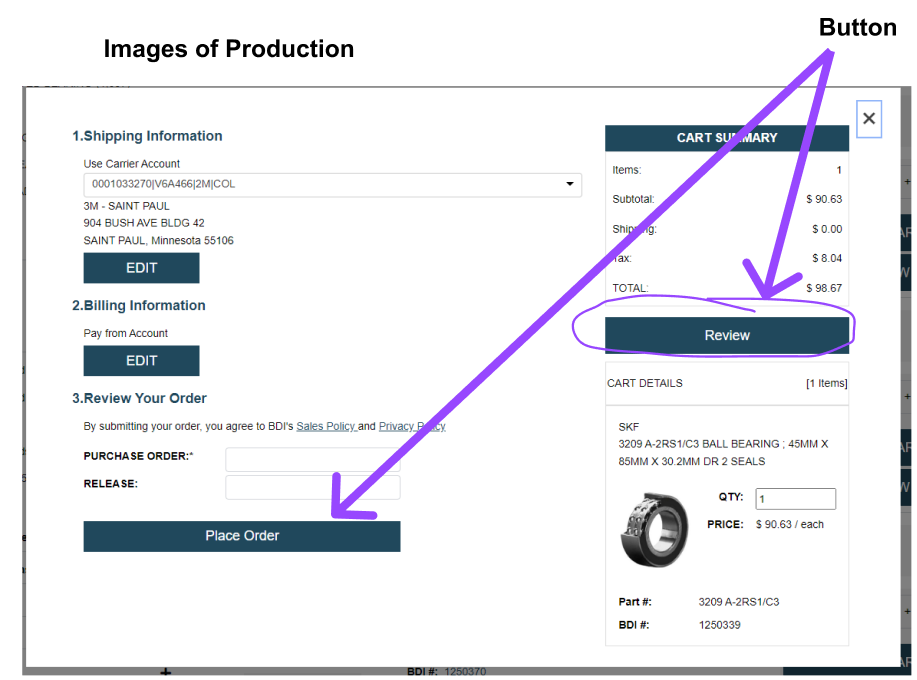
Developers had been sizing controls page by page, so a quantity field and its Add to Cart button often didn’t line up. I set shared heights for buttons, quantity fields, and input fields so every control feels the same across pages, and buyers recognize them wherever they appear.
[Decision 2]
[Repeat the before / after / options pattern. Two or three decisions is plenty.]
Keeping Quick Order one click away in the header
Competitors often hid Quick Order several pages deep. Ours was already easy to find, and internal discussions told us customers rely on it heavily, so the redesign kept it as a prominent button in the header on every page.
Outcome
- [Metric][What it measures]
- [Metric][What it measures]
- [Metric][What it measures]
The CEO and developers reviewed the new design in the interactive prototype before development began, so feedback came early instead of after pages were built. Try the prototype →
What I’d do next
[One honest paragraph: what you’d test, change, or measure with more time. Reviewers read this as judgment.]